Azure Gmail Email Agent
A production-grade AI email agent deployed on Azure that polls Gmail every 60 seconds, classifies each email as urgent, routine, or spam using Claude Sonnet 4.6, drafts a contextual reply, and sends it automatically. Built to demonstrate DevSecOps fundamentals: identity-based auth, secrets management, full IaC, and CI/CD — all under $2 in cloud spend.
Core Technologies
Architecture Components
- Azure VM (Ubuntu 22.04) with system-assigned managed identity as the agent runtime
- Azure Key Vault in RBAC mode — stores Gmail OAuth tokens and API keys, no hardcoded secrets
- Azure Log Analytics workspace for structured observability and agent telemetry
- Anthropic Claude Sonnet 4.6 via API — classifies emails and generates contextual draft replies
- Gmail API with OAuth 2.0 for polling inbox and sending automated responses
- Terraform managing the full stack — VNet, VM, Key Vault, Log Analytics — deployed and destroyed in one command
- Azure DevOps three-stage pipeline: plan → manual approval gate → apply
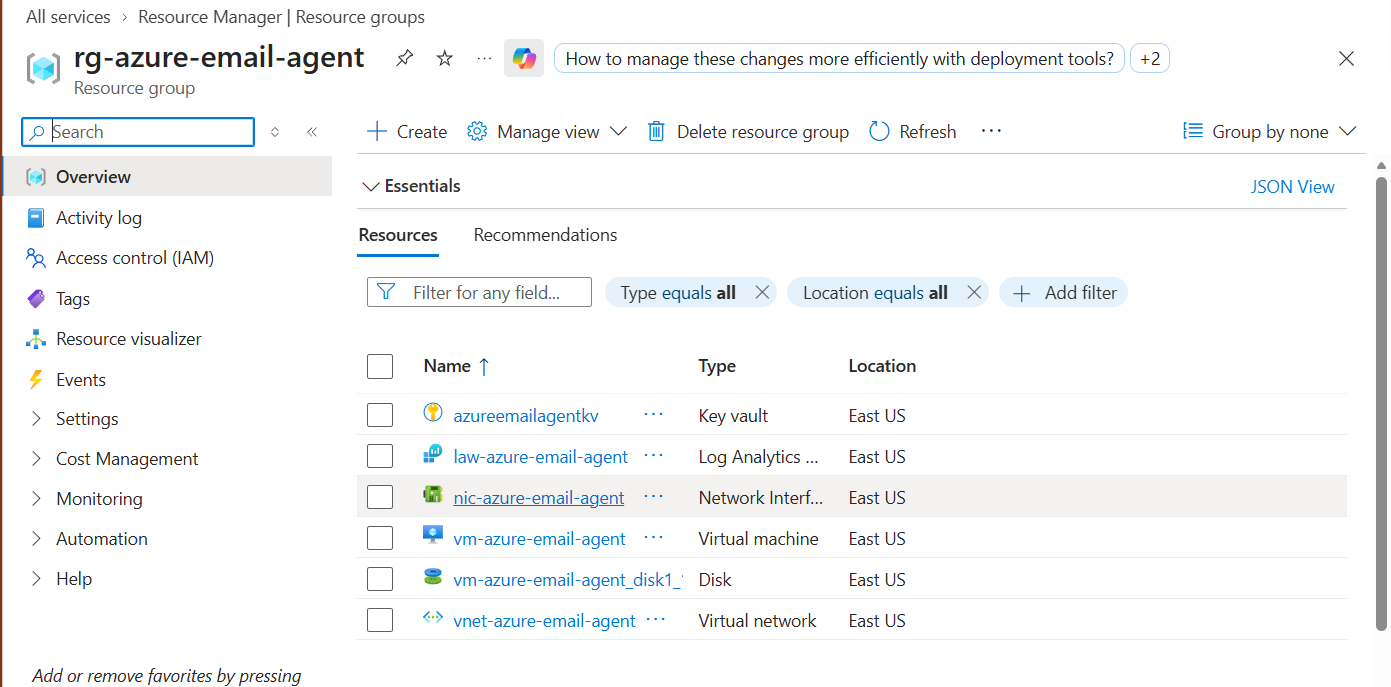
Azure Portal — rg-azure-email-agent resource group showing all 6 resources: Key Vault, Log Analytics workspace, Network Interface, Virtual Machine, Disk, and Virtual Network.
Problem
Managing email volume manually is time-consuming and error-prone. The real challenge was building an automated solution that meets production-grade security standards — no secrets in code, no public IP, identity-based auth, full IaC — while keeping total cloud spend under $2.
- Email classification and reply drafting is repetitive cognitive work that scales poorly with volume.
- Most automation tutorials skip production security: secrets in .env files, public IPs, no audit trail.
- Proving a system is reproducible requires destroying it and rebuilding from zero — not just deploying once.
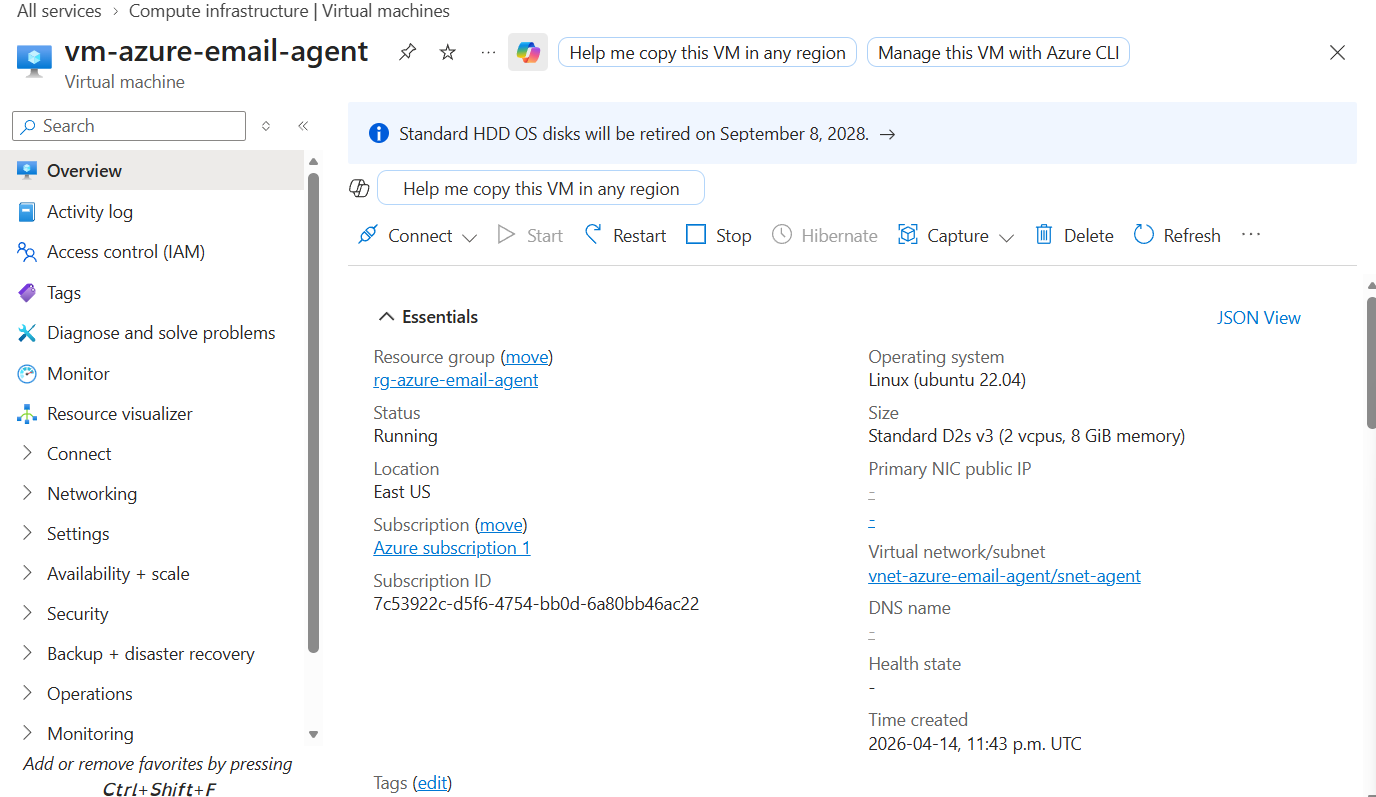
Azure VM — vm-azure-email-agent running Ubuntu 22.04, Status: Running, Primary NIC public IP: none. No exposed ports.
Solution
A Python agent deployed on Azure VM that polls Gmail, uses Claude Sonnet 4.6 to classify and draft replies, and sends them automatically — with every secret managed via Azure Key Vault and managed identity, never touching source control.
- 60-second Gmail poll loop — classifies each email as urgent, routine, or spam using Claude Sonnet 4.6.
- Contextual reply drafting: Claude generates replies based on email content with a cached system prompt.
- All secrets live in Azure Key Vault, fetched at runtime via managed identity — zero credentials in code.
- Full IaC with Terraform: entire stack deploys and destroys with one command, proving true reproducibility.
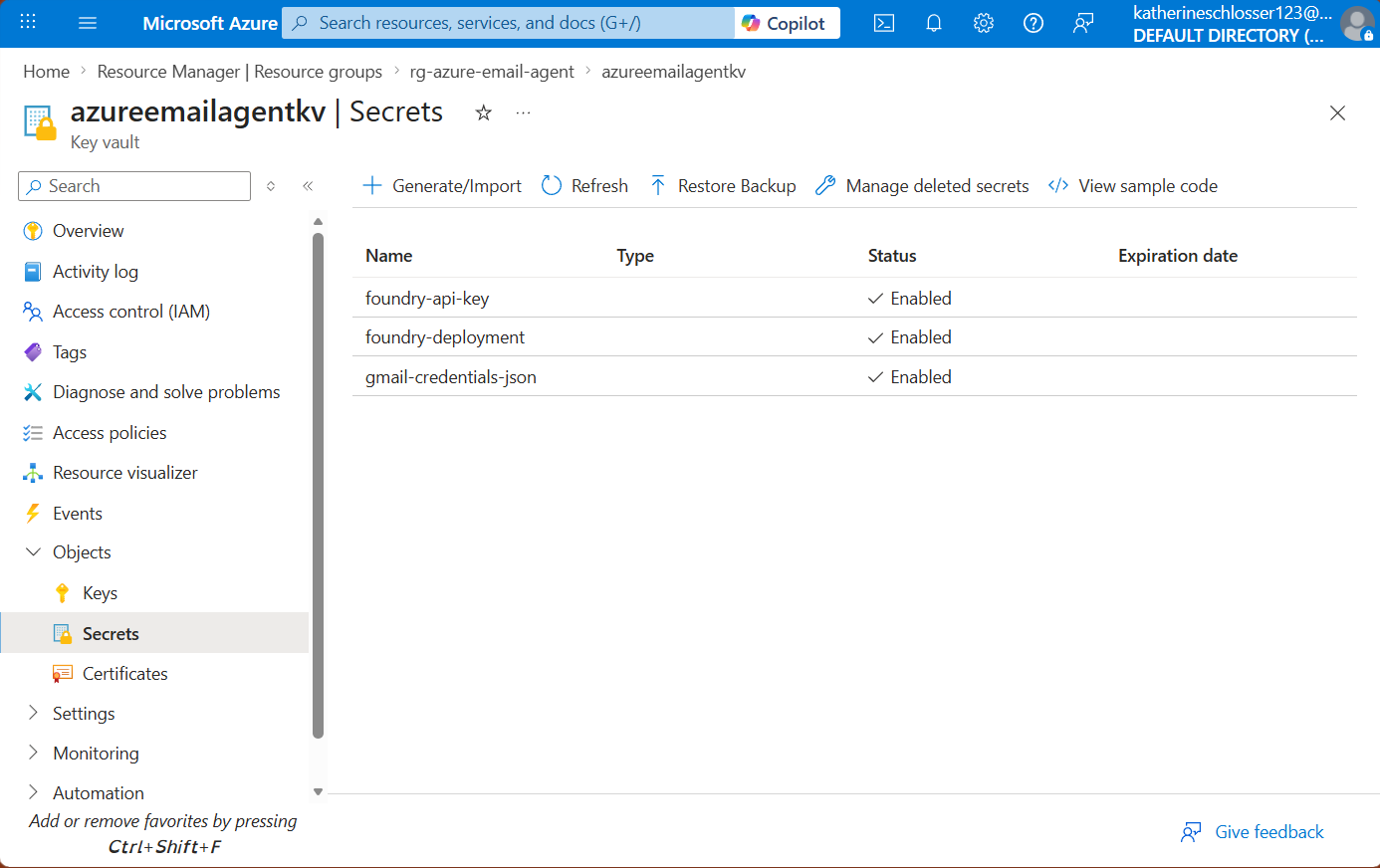
Azure Key Vault — three secrets listed (foundry-api-key, foundry-deployment, gmail-credentials-json), all enabled. No values visible, none in source control.
Outcome
A fully working AI email agent proven end-to-end, with the complete IaC lifecycle demonstrated from deploy through destroy.
- Fully working AI email agent — polls, classifies, drafts, and sends replies automatically.
- Complete IaC lifecycle demonstrated: deploy, prove, destroy, and rebuild from zero.
- Total Azure spend: ~$1.50 across all sessions — production-grade security at near-zero cost.
- Zero secrets committed to source control throughout the entire build.
Key Learnings & Decisions
Security & Identity
- System-assigned managed identity removes the credential rotation problem entirely — the VM authenticates to Key Vault without any stored secret.
- Key Vault in RBAC mode (not legacy access policies) gives fine-grained, auditable permission control per identity.
- No public IP on the VM: SSH access via Azure Bastion only, reducing the exposed attack surface to zero ports.
Infrastructure as Code
- Terraform one-command deploy and destroy proved true reproducibility — the ability to rebuild from zero is the evidence.
- A three-stage Azure DevOps pipeline with a manual approval gate before apply mirrors production change management at zero cost.
- Tagging all resources in Terraform made cost attribution and cleanup trivial.
AI Integration
- Prompt caching via cache_control: ephemeral reduces API latency and cost on repeated classifications — essential for a 60-second poll loop.
- Structured JSON output from Claude makes downstream parsing reliable and eliminates brittle string matching.
- Claude Sonnet 4.6 handles nuanced classification (urgent vs. routine vs. spam) better than keyword rules, with no false positives on test data.
Implementation Milestones
A breakdown of the key tasks and milestones that brought this project to life.
Local Environment Setup
CompleteWSL2, Python environment, Gmail API credentials, and OAuth 2.0 flow configured locally before touching any cloud infrastructure.
Key Tasks Completed
WSL2 + Python Environment
Confirmed Gmail API OAuth flow working locally before touching Azure. Test locally first is the rule.
Project Scaffold + GitHub
CompleteRepository initialized with .gitignore guarding against credential commits. Folder structure established for agent, Terraform, and pipeline code.
Key Tasks Completed
Repo Init + .gitignore
.gitignore covers .env, *.json token files, and __pycache__ from day one. No credentials ever touched the remote.
Terraform Infrastructure
CompleteFull Azure stack defined in Terraform: VNet, VM with managed identity, Key Vault in RBAC mode, and Log Analytics workspace.
Key Tasks Completed
VM + Managed Identity
System-assigned managed identity provisioned at VM creation. Key Vault RBAC role assignment wired in the same Terraform apply.
Key Vault + Log Analytics
Key Vault configured in RBAC mode with purge protection. Log Analytics workspace linked to VM diagnostics settings.
Python Agent Code
CompleteGmail polling loop, Claude classification and reply drafting, Key Vault secret fetch via managed identity SDK — all integrated and tested.
Key Tasks Completed
Gmail Poll + Classification
60-second poll loop with Claude Sonnet 4.6 classifying each email. Prompt caching on the system prompt keeps latency and cost down.
Key Vault SDK Integration
azure-identity DefaultAzureCredential handles managed identity auth transparently — same code works locally (via CLI auth) and on the VM (via managed identity).
Azure DevOps Pipeline
CompleteThree-stage pipeline: Terraform plan → manual approval gate → Terraform apply. Mirrors enterprise change management with a human gate before infrastructure changes land.
Key Tasks Completed
Pipeline YAML + Approval Gate
Manual approval gate configured before the apply stage. No infrastructure change lands without a human sign-off — production practice at zero extra cost.
Deploy + Prove + Destroy
CompleteFull end-to-end run: deploy via pipeline, prove agent works against live Gmail, destroy all resources. Total spend: ~$1.50.
Key Tasks Completed
End-to-End Demo
Agent classified and replied to test emails correctly. All resources destroyed cleanly after the demo. Azure cost report confirmed ~$1.50 total.
Case Study Published
In ProgressPortfolio case study written and published to adventuringghost.com.
Key Tasks Completed
Portfolio Entry
Case study content complete. Publishing to portfolio site now.
Monitoring & Analysis
Azure Log Analytics
Structured logs from the Python agent are shipped to a Log Analytics workspace, providing a queryable audit trail of every email processed, classification result, and reply sent.
Cost Tracking
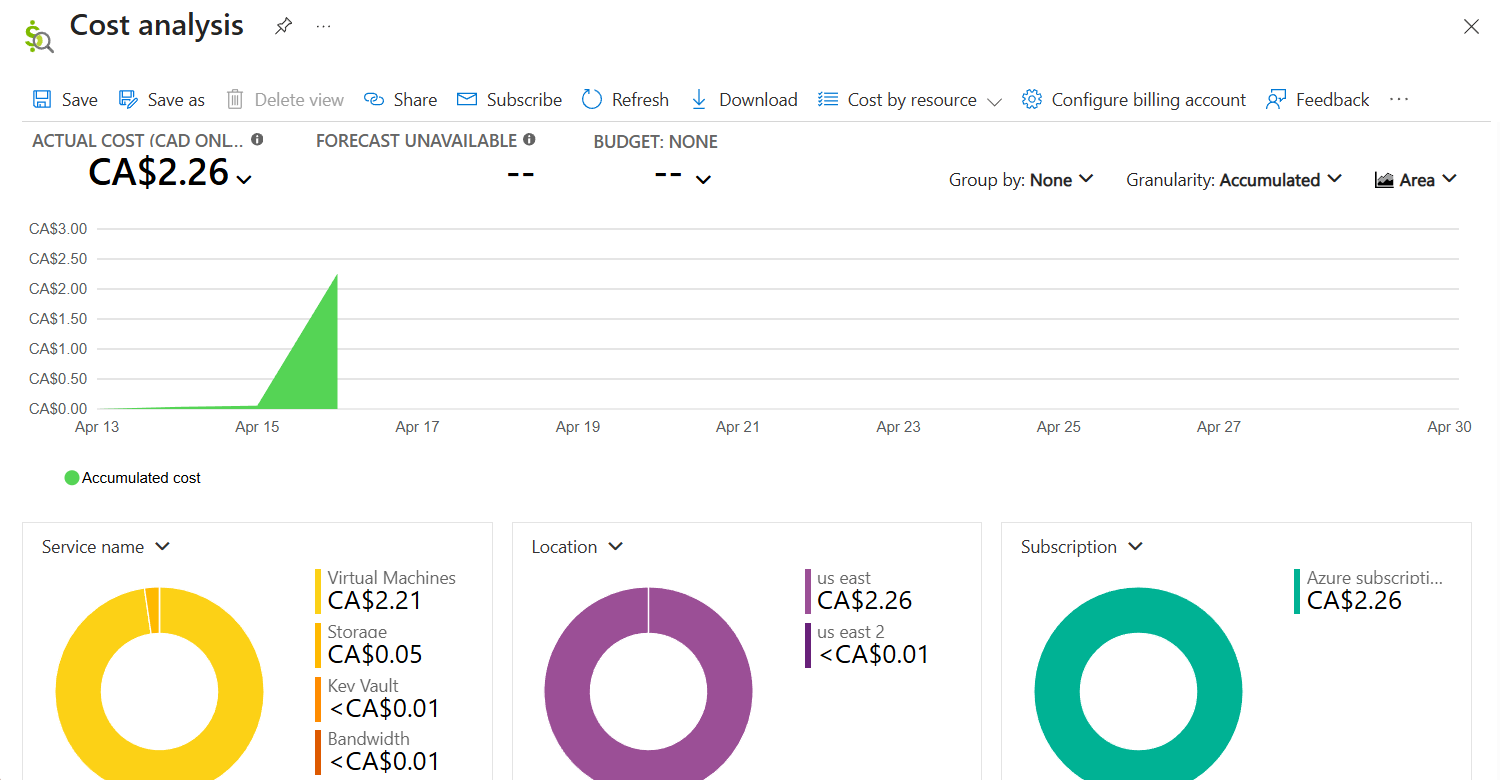
Total Azure spend across all sessions: CA$2.26 (~$1.50 USD). Virtual Machines accounted for the majority at CA$2.21 — the VM ran only during active demo sessions. Key Vault and bandwidth combined to less than CA$0.01.